Make an offer and close a filled opening
Outcome
You will have a recorded accepted offer and a closed opening where every remaining candidate has a deliberate outcome, response state, and Talent Pool decision.
Before you start
- Confirm the hiring decision and the authorised compensation range.
- Know who must approve the offer.
- Check the candidate's current email address and intended response deadline.
- Do not close the opening while candidates still have unresolved outcomes or uncertain response delivery.
Create and send the offer
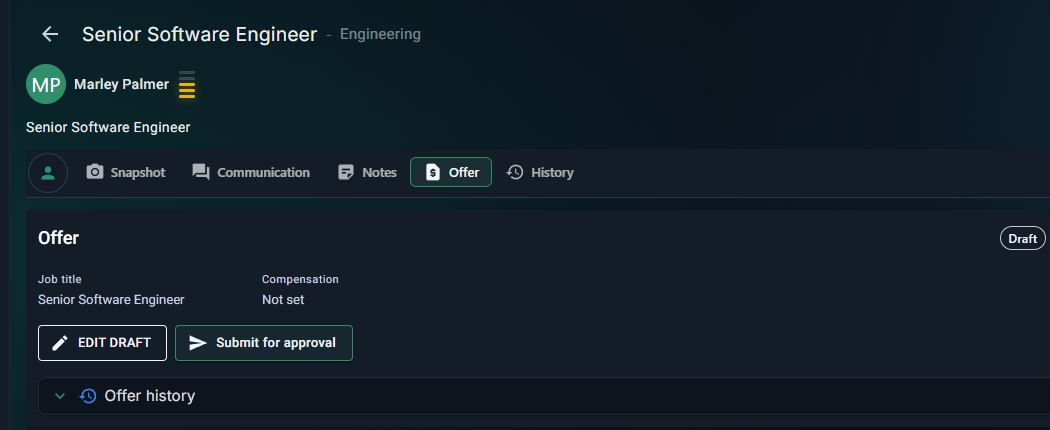
- Open the successful applicant and select Offer.
- Select Create draft offer.
- Review the job title, employment type, work arrangement, location, start date, expiry date, compensation, contingencies, and candidate-facing summary.
- Keep internal notes and approval context out of candidate-facing fields.
- Save the draft and resolve any compensation-band warning.
- If approval is required, select Submit for approval and choose the correct approver.
- After approval, select Send offer and review the candidate recipient and message before confirming.
- Record the candidate's response in RoleSage. If the candidate requests more time, resolve the extension request before treating the offer as settled.
Start the closure workflow
When accepted offers reach the opening's target hire count, open the closure workflow from the Opening editor.
- Confirm the accepted offer outcome and the hired candidates.
- Review interviewed candidates individually. Record a considered outcome and candidate message for each person.
- Review the remaining candidates. Use bulk handling only for a deliberately reviewed eligible group.
- Decide whether each strong future-fit candidate belongs in the Talent Pool and add a useful follow-up note.
- Review the final response coverage. Failed, blocked, missing, cancelled, or uncertain delivery is not complete.
- Select Close opening only when the checklist is complete.
Check the result
The Opening should show Closed Filled and be locked. Offer history, candidate messages, rejection history, and Talent Pool choices remain available. If hiring needs to resume, use Reopen Opening so the prior closure record is preserved.
Next step
Review Talent Pool follow-up dates and the hiring report while the evidence is fresh.
For detailed candidate-response controls, see Reject applicants and track candidate responses and Configure candidate rejection responses.