Create and publish your first Role Opening
Outcome
You will have a reusable Role and a Role Opening with reviewed details, skills, questions, and a public candidate page.
Before you start
- Have a job description or a short role brief ready.
- Confirm which team owns the hire and who leads it.
- Know the employment type, work arrangement, location, compensation range, and target number of hires.
- You need permission to create Roles and Role Openings for the employer.
Create the Role
- Open Roles and select Create Role.
- Paste the job description or describe the role to the Role Coach. You can also start manually.
- Give the Role a clear internal title.
- Review Details, Brief, Context Prompt, Questions, and Skills.
- Approve, edit, or remove suggested skills. Mark genuine non-negotiable skills as must-have rather than treating every skill as essential.
- Check the RoleSage Analysis for gaps in the brief, screening questions, and hiring risks.
- Move the Role to Ready when the hiring team agrees that it represents the job.
Create the Role Opening
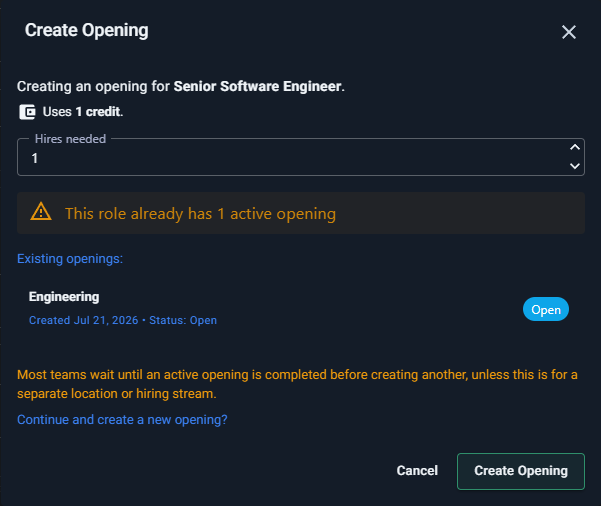
- Select Create Opening.
- Review the confirmation, including any unapproved skills and existing openings for the same Role.
- Set the target number of hires and confirm.
- In the Opening editor, review the opening-specific Details, Offer, Brief, Questions, and Skills. Changes here apply to this hiring instance rather than silently rewriting the reusable Role.
- Open Public Page and review the candidate-facing advertisement and preview.
- Copy the public URL only after the written advertisement contains everything a candidate needs to understand the role.
If your employer uses an approval workflow, the opening may need approval before it becomes open to candidates.
Check the result
Return to Openings. The opening should appear under the correct team with its current status. Open its public page in a private browser window to confirm that the candidate view is complete.
Next step
Share the opening through your chosen channels. When applications arrive, follow Review and shortlist applicants using evidence.
If the generated skills do not represent the job, see Role skills look wrong after creating a role. If the analysis is too broad, see RoleSage analysis feels generic.