Schedule and run interviews
Outcome
You will have a scheduled interview with the right participants, a reviewed invitation, and a durable record of interviewer notes and recommendations.
Before you start
- Confirm that the applicant should progress to interview.
- Decide the interview stage, purpose, duration, interviewers, and decision owner.
- Have the meeting location or video URL ready.
- Check that every intended recipient has the correct email address.
Add and schedule the interview
- Open the applicant and select Interviews.
- Select Add interview.
- Choose a suggested stage such as Screen, Technical, Behavioural, or Final, or enter a clear custom stage.
- Add the interviewers who are responsible for this stage.
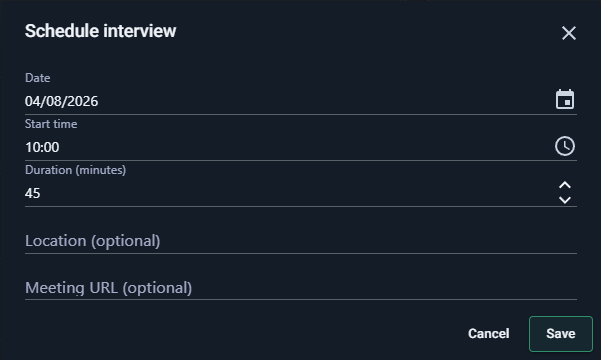
- Open the new interview and select Schedule interview.
- Set the date and time, duration, optional location, and optional meeting URL.
- Save the schedule before preparing invitations.
Review and send invitations
- Select the invitation action.
- Review every recipient. Remove anyone who should not receive candidate or meeting details.
- Add an optional personal message if it helps participants prepare.
- Send the invitation and confirm the delivery state shown for each recipient.
- If one recipient fails, resolve that delivery rather than resending blindly to everyone.
Run the interview and capture the decision
- Each interviewer records their own notes and recommendation.
- Keep notes relevant to the role and avoid unsupported personal judgments or sensitive information.
- Review the combined interview summary after the individual evidence is complete.
- Record the stage outcome: proceed, hold, or decline.
- Add another interview stage only when it answers a real remaining question.
Check the result
Open Interviews. The scheduled time should use the viewer's local time, the intended interviewers should be listed, and the interview should show the current notes and decision state.
Next step
Progress the applicant to another evidence-gathering stage or, when the team is ready, follow Make an offer and close a filled opening.
If an invitation is not received, see Not receiving RoleSage emails.